

1·
5 days agoPictrs Test: 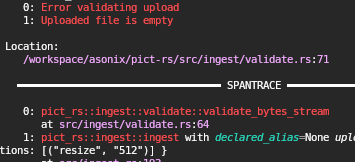
Looks all good now!

Self Proclaimed Internet user and Administrator of Reddthat
Pictrs Test:
Looks all good now!
I’ve been having power outages recently and haven’t managed to get my ssh-key from my computer. And since we moved to the new dedicated server I forgot to add my spare! Thus it’s taking a little longer to investigate.
If my power holds out I’ll nab the keys tonight and properly setup my other keys so I’ll be able to access from my phone.
If catbox wasn’t down, I’d be able to comment more on it, but let’s try to keep things Wholesome. Including comments please?
Thanks
This happens when pictrs crashes :(
It usually fixes itself within a minute or two … But this looks like it’s a bigger problem. I should be able to look at it after work!
Thank you for making Reddthat a nicer place to be ☺️ !

Thanks, patched and its page=2 now. (I wonder how LW never managed to see that… They must not be using that image…!
SORTED! Ended up patching it myself. Enjoy :D
😥. I will fix it! I think because we are still going via nginx, it’s still has to pass the go-away challenges, which it must be failing and thats why…
Annnd, as we just moved I also only have key access to the server and I made all new keys and don’t have one on my other devices yet. (A classic)
Edit: nope, it’s now attempting to connect over https to the container… I think I’ll need to write a proper patch for it to allow for a override.
It also looks dead in the water/feature complete. So I’ve moved to FSFs container. (https://github.com/Fedihosting-Foundation-Forks/mlmym).
If I end up making a patch I’ll upstream. (I’m surprised LW hasn’t made one already)
Fun Pics:
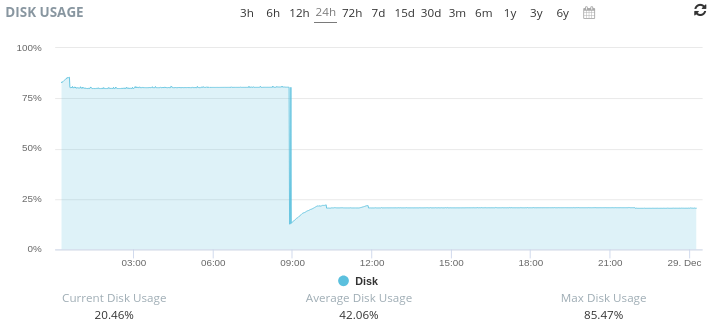
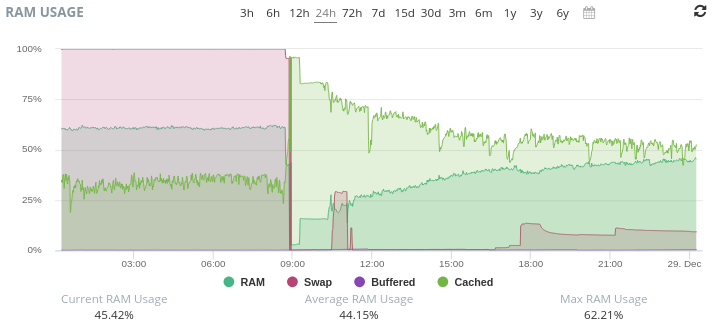
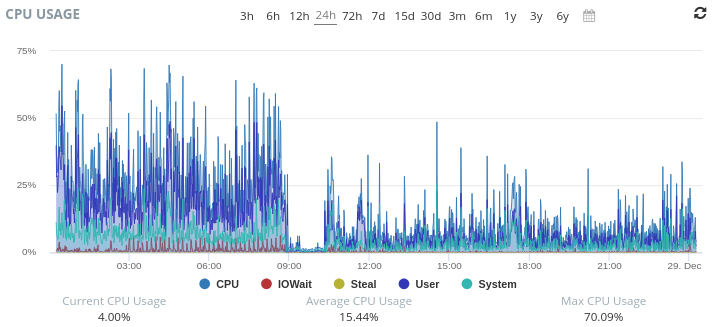
I had to tell our main_nginx that it is “reddthat.com”.
services:
  proxy:
    image: docker.io/library/nginx
    ...etc...
    networks:
      default:
      lemmy_internal:
        aliases:
          - reddthat.com
Now its: {user} -> CF -> {server_nginx} -> {frontend_nginx} -> mlmym => ((docker internal network)) -> {main_nginx} -> {{lemmy-ui/api}}
Instead of: {user} -> CF -> {server_nginx} -> {frontend_nginx} -> mlmym => CF -> {main_nginx} -> {{lemmy-ui/api}}
I believe I’ve fixed it.
A recent docker update no longer supports overriding hosts with hostnames. (I was telling mlmym that ‘reddthat.com’ is ‘lemmy-ui’. Which would make it request directly to the lemmy-ui container rather than going back out to CF and back again.
(For others/if you want to know the nitty gritty). I was doing this:
    networks:
      lemmy_internal:
    extra_hosts:
      - "reddthat.com:lemmy-ui"
Which did actually work, but now it doesn’t since I updated/installed docker compose v5.0.0.
(Seems the correctly enforce the host:IP format now). So I had to do a work around.
Advertisements are not welcome here. 👌
You rock too!
We’ve got oodles of gigabits!
:( yeah the outage notification woke me up.
As it was late I did a work around to temporarily fix it. I’ll be looking at it once I’ve had coffee.
.<
I missed this. Please do the community proud. (Don’t just focus on Toes… mmmk?) 😂
Fixed up. All seems to be working. 😪
For those of you who were watching, check out our possible new status page: https://statusv2.reddthat.com/ (it has our CPU/Ram/Disk usages on display for everyone to peruse)
Working on fixing old.reddthat.com.
Migrated Successfully!
Pictrs Test: 










You should be able to upload a different thumbnail too. And if you do that Lemmy should use that thumbnail over whatever it deems fit. (Which would be whatever is in the centre).