Oh no definitely not. This was early 90’s/late 80’s software.
- 55 Posts
- 984 Comments
Joined 1 年前
Cake day: 2024年8月26日
You are not logged in. If you use a Fediverse account that is able to follow users, you can follow this user.
lol it’s funny because as I typed this, I was thinking someone would think that was it. I loved the Jumpstart games and especially the 3rd grade one. But that’s not it, unfortunately. I’m grateful I remember it, but I played it so much I can’t forget.
I keep trying to find this old educational game that was creepy. I don’t remember much else about it and it is frustrating to know I’ll likely never figure this out. I don’t even remember what kind of educational content it was like math or reading or what.
Edit: thanks for the suggestions, everyone. And keep em coming!
I don’t remember much about the game except it was set in a house of some sorts and had this really creepy vibe to it. I want to say it involved aliens, but I don’t think that’s accurate. Might have been monsters instead. They weren’t humanoid-like creatures though.
We got it the same time we got this other computer game called Radio Addition and may have been in a pack together, but might have just been next to each other when my mom bought them. It ran on Windows, to further narrow it down.
Edit2: I found it by chance! The game I was thinking of was Math Blaster Mystery The Great Brain Robbery https://www.youtube.com/watch?v=o3USKxJd4J4&pp=ygUUTWF0aCBibGFzdGVyIG15c3Rlcnk%3D
Y’all got me thinking more about it and I asked an LLM tonight and it said this was likely the game I’m remembering and it’s right!! Super creepy colors and music I remember.
So that solves the mystery for me lol. Thanks for the recommendations!

 5·1 天前
Pretty much. But this new one is being done in a new engine (Unreal) and a lot of it is being done by AI. Two things that weren’t being done before, certainly on the MCC.
Definitely agreed there lol that was wholly unrealistic and no defense for that

We exist, but ashamed to admit.
I’ve worked on my fair share of projects with no backup and working off the only copy I created.
Being 2005, I’d say it’d be even more prevalent back then for that type of behavior too.
I still don’t understand how new humans are born, if that was ever explained? Like we have sex in the matrix and that somehow makes them in the real world and then the machines take them out and place them in their own pods? And the pods grow with the human as they age?
Worst case, if you are under a region where they can, they can deduct the cost of the equipment from your last paycheck. But a lot of places don’t allow companies to do this to employees and under those circumstances, the worst that could happen is them trying to go after you in court for the equipment’s cost after sending you your full paycheck. Most companies won’t go that far and will just remotely try to wipe the device or brick it so it can’t be used and/or data can’t be recovered from it. Though some don’t even go that far and just accept the loss.
Other possibility is if there is sensitive information on the equipment, whether it be stuff like US HIPAA covered data or company secrets. They could get law enforcement involved under some circumstances or may go the extra mile to get a lawsuit against you until you comply.
It’s really not your duty to pay to send it back, especially not show up in person to an office to give it to them. That’s ridiculous they even have that policy, especially what with disgruntled employees who might become violent. Such a stupid, shortsighted decision on their part to have that policy that will lead to future headaches, if not a tragedy with loss of life from some psycho.
They should be sending you a shipping label and box to send back the stuff. All paid for by them. I wouldn’t trust them to pay you back if you paid to send it to them. In this day and age, they should have the capability to do this on their own like my job does to get their shit back, or at least to remotely wipe the devices.

 10·4 天前
It’s absolutely crazy to me how trailers/teasers are treated nowadays.
They are supposed to be what hypes people up for the movie. Not the thing you wait for! “The trailer will release on X date”.
I’m not hyped for these movies anymore, but when I was, I never cared about the trailer/teaser. I wanted to know when the actual movie was getting released.
Now we get them hyping us up for the trailer/teaser and copyright striking people freely advertising for them.
 1·6 天前
That’s actually what I went with. A Samsung Pro Endurance and specifically for the reason you cited since it’ll be on 24/7. But 128GB was the smallest my local store had. It was only $20 USD.
I’m sure Amazon has them in smaller varieties, but I rather go to brick and mortar.
I feel I could have gone much lower for capacity and cost and it would have been a better choice for this purpose.
Agreed. Was looking for a micro SD for my Raspberry Pi and can’t find anything in local retail stores beneath 128GB which seems like overkill for my use-case.
And same for bootable flash drives. I hate having to use 64GB instead of a 8GB which are no longer easy to find in local retail stores. I’d settle for 16GB at this point!
 3·6 天前
Snowboarding games always seemed to have mostly drum and bass music like SSX and Transworld. And then you had games like Sonic that had a ton of it plus some great rock from Crush 40.
 23·7 天前
It’s not the number like a combo, it’s the ordering system they use inside. Like when you’re waiting on your food and they yell out “Order number 99, your food is ready.” They’re just getting rid of the number 67 from that system so it will go from 66 to 68. No customer will get that number assigned to them to let them know their food is ready.
 10·7 天前
This is nothing new, except “relatively new” in the last 100 years. Check out the Phoebus Cartel. It’s a crazy story about light bulb manufacturers getting together to agree to make light bulbs last less so they will guarantee repeat customers.
It’s why I always laugh when Sylvania shows an ad about their “long lasting bulbs”.
You’d be crazy to not think the other industries haven’t been doing this too.
 5·8 天前
Exact feeling I have. I never tire seeing these pictures.
That looks so bomb 🤤 definitely one of the best pizzas I’ve ever seen

 2·10 天前
You’re welcome! I’m glad I could provide some helpful stuff to start :)
Ah I see! I’m also a Fusion 360 user too! I was thinking you were talking about stuff like Blender or CGI creation in Unreal Engine which are much more demanding on your computer. But yeah, Fusion 360 isn’t that bad at all!
You’re absolutely right about the specs then! Your gaming sounds like what you will want to check out.
I’d highly recommend visiting the various games’ pages on a site like Steam and seeing their system requirements. You’ll want a good processor and video card (GPU = Graphics Processor Unit, also called a graphics card) more than anything else which most games will really thrive on. Most gamers seem to do well with getting an Intel i5 or i7 or a AMD Ryzen 5 or Ryzen 7. A i9 or Ryzen 9 is probably overkill. For a GPU, this is something you’ll want to research on. I’d recommend checking out some YouTube videos and watch the most recent ones you can that compare the graphics cards and show you how they perform in games. Maybe even check out some YouTubers who showcase the games you’re interested in and can talk about what specs worked well for them too.
Oh okay, that actually seems like on the lower to middle end of things, all things considered.
One of the best things you can do is to check out the system requirements for some of those things you hope to run which can help give you an idea of what you’ll need.
For example, if you view the game House Flippers 2 on Steam, you’ll see the screenshot below which kind of gives you an idea of what you want to aim for in terms of the right pieces you’ll want to buy for your computer:
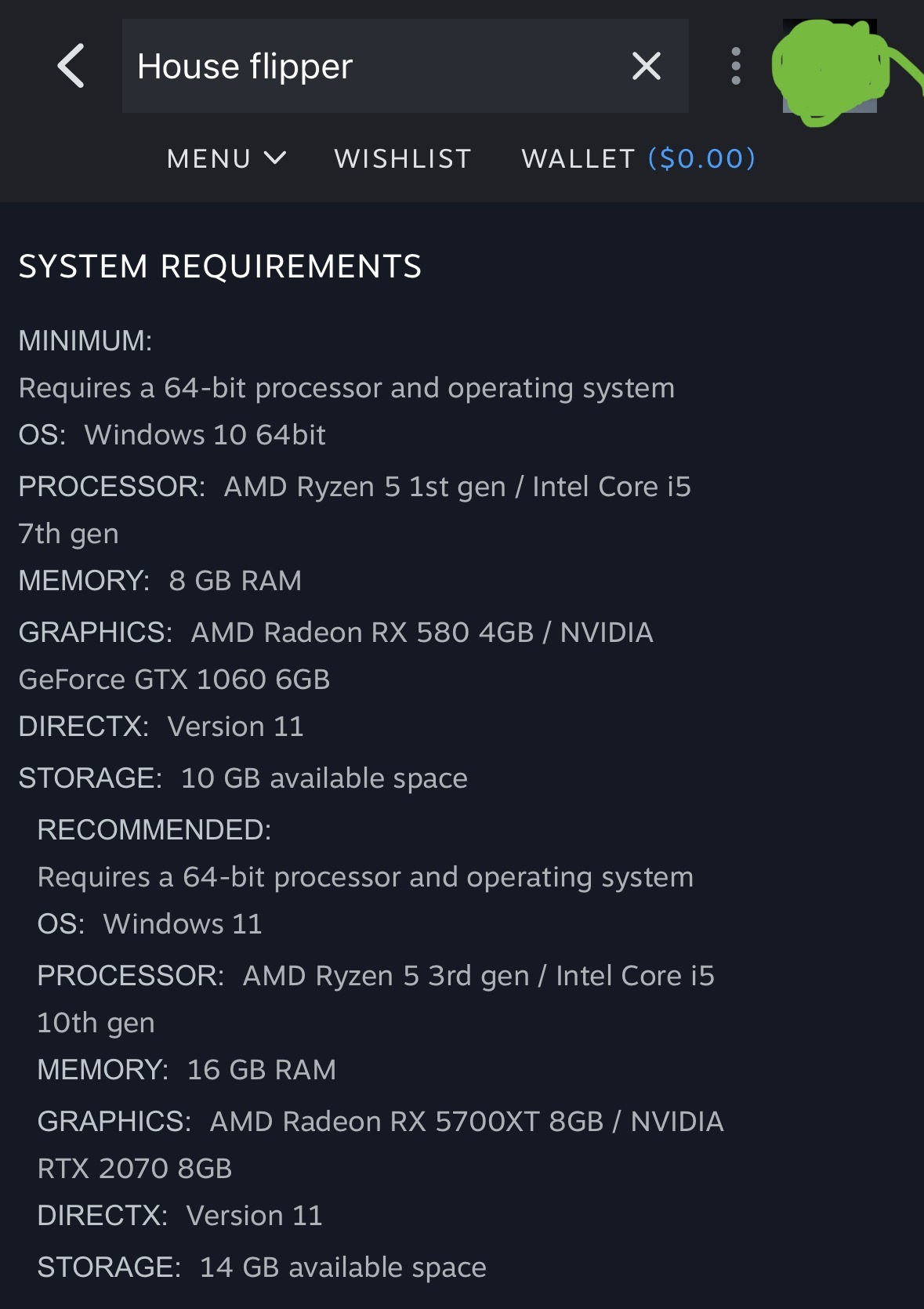
You’ll ideally want to go for the recommended or above the recommended for the best possible performance of the game. The minimum specs are the absolute lowest that can run this game at its most basic level, which will often not be the best quality or run at the best specs, so you don’t want to follow those.
What are some of the 3D modeling programs you hope to use? That will likely be more intensive, depending on what it is, than the gaming will be.
A great resource for building and budgeting a PC build is pc part picker: https://pcpartpicker.com/
If you’re not familiar with it, it basically helps you find and build a PC and shows you about how much it all will cost you. It’s also a great resource for new beginners since it guides you through exactly what is needed so you don’t end up surprised and have to make multiple trips to the store/purchases online.
I’m not aware of a dedicated community, but I’m willing to help if I can here. What do you need help with?














Not this one either, sadly. Thanks for the suggestion.
It’s crazy knowing what it’s not but not knowing what it is lol.